Lec2 Basic CSS
基础选择器
选择器组
body, h1, h2, ul, ol, li {
    margin: 0;
    padding: 0;
}

[type="checkbox"], [type="radio"] {
    box-sizing: border-box;
    padding: 0;
}
设置字体
h1 {
    font-family: Optima, Georgia, serif;
}
serif:通用字体族
通用字体族
- serif 衬线体
- Sans-Serif 无衬线体
- Cursive 手写体
- Fantasy
- Monospace 等宽字体
Note
- 字体列表最后写上通用字体族
- 英文字体放在中文字体前面
Note
@font-face {
    font-family: 'Megrim';
    src: url('/mergrim.woff2') format('woff2');
}

h1 {
    font-family:  'Megrim';
}
Note
- 关键字
- small、medium、large
- 长度
- px、em
- 百分数
- 相对于父元素的大小
Note
- 斜体
font-style: italic
Note
用于调整行高
line-height: 45px;
line-height: 1.6;
Note
font: style weight size/height family
设置文字样式
- text-align
- 设置文字的对齐方式
- left center right justify
- spacing
- letter-spacing
- word-spacing
- text-indent
- 调整缩进
- text-decoration
- 用于文字修饰
- none underline line-through overline
- white-space
- normal nowrap pre pre-wrap pre-line
- text-shadow
text-shadow color offset-x offset-y blur-radius
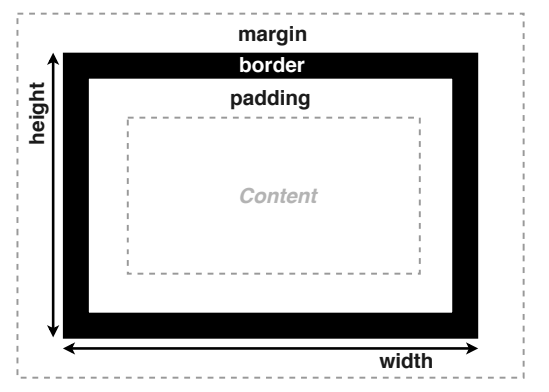
盒模型基础
- width height
- padding
- border
- 边框样式、粗细和颜色
- border-width border-style border-color
- 设置方向:border-top-color border-left
- margin
- margin-left: auto
- margin-collapse
- 垂直方向 margin 会合并,取较大的一个
- margin 可以取负值
-
overflow 控制内容溢出时的行为
- visible hidden scroll
-
min-max
- min-width max-width
- min-height max-height
CSS 中的盒子
Node
- 根据 DOM 树生成盒子
- 摆放盒子 (Layout)
- 盒子尺寸和类型
- 定位模式
- 结点在 DOM 树中的位置
- 其它信息
盒子效果
- border-radius 圆角效果
- background
- background-image/color/repeat/position/size
CSS 继承
- 选择器的特异度:越特殊的选择器优先级越高
- 属性覆盖:高优先级的CSS属性会覆盖低优先级的属性
- 继承:某些属性会自动继承其父元素的计算值,除非显式指定一个值
- 显式继承
- 如:
box-sizing: inherit;
- 如: